NetMap
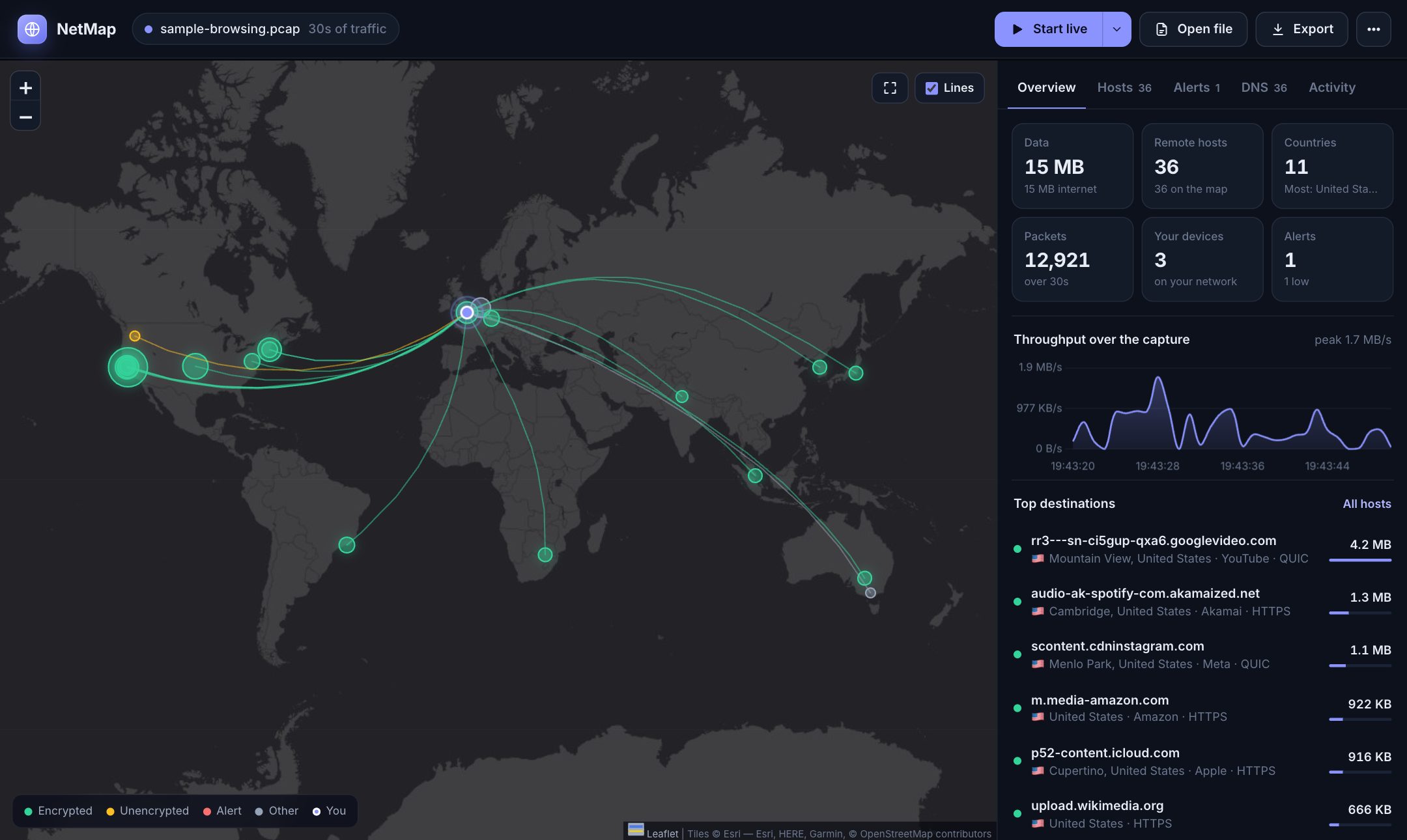
See where your internet traffic goes. NetMap puts every server your computer talks to on a world map, with its real name, how much data went there, whether the connection is encrypted, and alerts for anything suspicious. It's free and open source, and everything runs on your own machine.
Try the live demo Download View on GitHub
-
Where your data goes
Servers grouped by location on a world map, sized by data, with lines from you. Lines animate during live capture.
-
Real names, not just IPs
Names come from DNS, the site name in HTTPS handshakes (SNI), HTTP headers and reverse DNS, plus the company behind each one.
-
Encrypted or not
Green for encrypted, yellow for readable-on-the-wire, red for alerts. You can see at a glance what's private.
-
Security alerts
Port scans, backdoor ports, Telnet/SMB/RDP, plain-text logins, malware-style random domains, DNS tunnelling and large uploads, each explained in plain English.
-
Live or from a file
Watch this computer live (one password prompt, no terminal), or drop in any Wireshark
.pcap/.pcapng. -
Export & share
An offline interactive HTML report, KML for Google My Maps and Google Earth, CSV, a text summary and JSON.
Start in one step
You need Python 3.9 or newer. Download the ZIP (no git needed), unzip it, then:
| Your computer | Do this |
|---|---|
| macOS | Double-click NetMap.command. The first time, macOS may block it: right-click → Open → Open. |
| Windows | Double-click start.bat. For live capture, install Npcap. |
| Linux | Run ./run_dashboard.sh |
The first launch sets itself up in about a minute, then opens http://127.0.0.1:5050. See ways to run it for all the options.
How it works, in one picture
flowchart LR
    L["Live capture"] --> A
    F["Wireshark file"] --> A
    A["Decode packets"] --> N["Find real names<br/>DNS · SNI · HTTP"] --> G["Locate<br/>GeoIP"] --> R["Alert rules"]
    R --> D["Live dashboard"]
    R --> E["Reports<br/>HTML · KML · CSV"]
Read the full explanation, with 9 diagrams, in How it works.
Explore
| Visual tour | Every screen, with screenshots |
| Live demo | The real dashboard in your browser with sample data, no install |
| Everything included | The complete feature list |
| How it works | Architecture and every step, with diagrams |
| Tech stack | What it's built with, and why |
| Demo guide | Scripts for presenting NetMap in 5 or 15 minutes |
| Ways to run it | Run it without cloning, and compare the options |
| Contributing | Help improve NetMap |
Privacy
NetMap analyzes everything locally and uploads nothing. The sample captures on this site are synthetic: an imaginary home network, generated by scripts in the repository.